
User's Manual Part 2







Setting the SecureDesk Security Level
188 Check Point Safe@Office User Guide
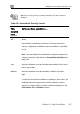
This
secu
level
rity
...
Enforces these conditions...
High d and
t
ers
The most recent antivirus software must be installe
enabled.
In order for the antivirus software to qualify as the mos
recent, the installed antivirus components' version numb
must match the version numbers displayed in the Service
Status table's Current column.
To change the SecureDesk security level
1. Click Security in the main menu, and click the SecureDesk tab.
The SecureDesk page appears.
2. Drag the lever to the desired level.
SecureDesk enforces the new security level conditions.
If you rai
you om
Current D
message, to the latest version link
appears.
For an ex
SecureD Messages on page 191.
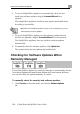
3. If necess
a. Click
The M urity page opens in a new window, with the McAfee
Secure-1 VirusScan ASaP popup window on top.
b. Follow the online instructions to complete updating.
sed the security level, and the antivirus software installed on
puter does not meet the new security level conditions, the
evice Status and Actions area displays an appropriate status
and the Update your antivirus software
r c
planation of all status messages and their colors, see
esk Status
ary, update your antivirus software by doing the following:
Update your antivirus software to the latest version.
cAfee Sec