
User's Manual Part 2





Viewing the Event Log
Chapter 6: Viewing Reports 143
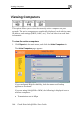
To view the event log
• Click Reports in the main menu, and c b.
The Event Log page appears.
lick the Event Log ta
You ca
• Clic
• Clic ar all events.
• If an event is highlighted in red, indicating a blocked attack on
your network, you can display the attacker’s details, by clicking
on the IP address of the attacking machine.
The Safe@Office appliance queries the Internet WHOIS server, and a
window displays the name of the entity to whom the IP address is
registered and their contact information. This information is useful in
tracking down hackers.
n do any of the following:
k the Refresh button to refresh the display.
k the Clear button to cle