
User's Manual Part 2





Virus Scanning
178 Check Point Safe@Office User Guide
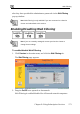
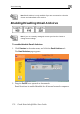
2. Click Snooze.
• Email Antivirus is temporarily disabled for all internal network
computers.
• The Snooze button changes to Resume.
• The Email Antivirus Off popup window opens.
To re-enable the service, click Resume, either in the popup window,
or on the Email
3.
Antivirus page.
network computers.
changes to Snooze.
indow,
• The service is re-enabled for all internal
• If you clicked Resume in the Email Antivirus page, the button
• If you clicked Resume in the Email Antivirus Off popup w
the popup window closes.