
User's Manual Part 2





Virus Scanning
Chapter 8: Using Subscription Services 177
Selecting Protocols for Scanning
If you are locally managed, you can define which protocols should be
ned for
l retrieving (POP3). If enabled, all incoming email in the POP3
ocol will be scanned
• Email sending (SMTP). If enabled, all outgoing email will be
scanned
Protocols m
scan
• Emai
prot
viruses:
arked with
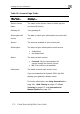
will be scanned, while those marked with will
not.
N are remotely managed, contact your Service Center to
c
To enable ning for a protocol
1. In the Protocols area, click
ote: If you
hange these settings.
virus scan
or next to the desired protocol.
2. Click Apply
or
.
Temp arily Disabling Email Antivirus
aving problems sending or receiving email you can tempor
mail Antivirus service.
If you are h arily
disable the E
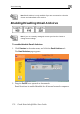
To temporarily disable Email Antivirus
1. Click Services in the main menu, and click the Email Antivirus tab.
The Email Antivirus page appears.