
User's Manual Part 2





Web Filtering
174 Check Point Safe@Office User Guide
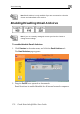
Selecting Categories for Blocking
You can define which types of Web sites should be considered appropriate
for your family or office members, by selecting the categories. Categories
marked with
will remain visible, while categories marked with will be
blocked and will require the administrator password for viewing.
Note: If you are remotely managed, contact your Service Center to
change these settings.
To allo /block a category w
1. In the Allow Categories area, click
or next to the desired
category.
2. Click Apply.
Temporarily Disabling Web Filtering
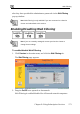
If desired, you can temporarily disable the Web Filtering service.
To temporarily disable Web Filtering
lick the Web Filtering tab.
2. Click Snooze.
• Web Filtering is temporarily disabled for all internal network
computers.
1. Click Services in the main menu, and c
The Web Filtering page appears.