
User's Manual Part 2





Viewing the Event Log
142 Check Point Safe@Office User Guide
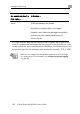
An event marked in
olor…
Indicates…
this c
Green Traffic accepted by the firewall.
ccept
r, such tra
y polic
Service Center.
By default, a
Howeve
by a securit
ed traffic is not logged.
ffic may be logged if specified
y downloaded from your
The logs detail the date and the time the ev red, and its type. If the
event is a communication attempt that was rejected by the firewall, the event
inclu on I , and
the protocol tempt (for example, TCP or UDP).
ent occur
details de the source and destinati
used for the communication at
P address, the destination port
N Safe@O logs
t mation, ng
o
ote: You can configure the
o a Syslog server. For infor
ffice appliance to send event
see Configuring Syslog Loggi
n page 263.