
User's Manual Part 2




Connecting to a Service Center
Chapter 8: Using Subscription Services 167
ecify a Service Center, select Specified IP and then in the
, e
given to you by your system administrator.
5. Click Next.
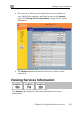
• The pears.
• If the Service Center requires authentication, the Service Center
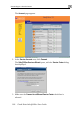
4. Do one of the following:
• To connect to the SofaWare Service Center, select
usercenter.sofaware.com.
• To sp
Specified IP field nter the desired Service Center’s IP address, as
Connecting… screen ap
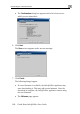
Login dialog box appears.
Enter your gateway ID and registration
as given to you by your service provider
key in the appropriate fields,
, then click Next.
• The Connecting… screen appears.