
User's Manual Part 2




Connecting to a Service Center
166 Check Point Safe@Office User Guide
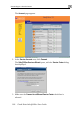
The Account page appears.
2. In the Service Account area, click Connect.
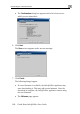
The Safe@Office Services Wizard opens, with the Service Center dialog
b splayed. ox di
3. Make sure the Connect to a different Service Center check box is
selected.