
User's Manual Part 2




Defining an Exposed Host
Chapter 7: Setting Your Security Policy 163
Deleting Rules
To
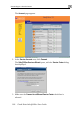
1. C , and click the Rules tab.
2.
delete an existing rule
lick Security in the main menu
The Rules page appears.
Click the
icon of the rule you wish to delete.
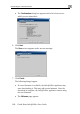
A confirmation message appears.
3.
The rule is deleted.
Defining an Exposed Host
Click OK.
The Safe@Office appliance allows you to define an exposed host, which i
computer that is not protected by the firewall. This is useful for setting up a
public server. It allows unlimited incoming and outgoing connections
between the Internet and the exposed host computer.
s a
The exposed host receives all traffic that was not forwarded to another
puter b
com y use of Allow and Forward rules.
Warning - Entering an IP address may make the designated computer
vulnerable to hacker attacks. Defining an exposed host is not
recommended unless you are fully aware of the security risks.
To define a computer as an exposed host
1. Click Security in the main menu, and click the Exposed Host tab.