
User's Manual Part 2





Viewing the Event Log
Chapter 6: Viewing Reports 141
Chapter 6
This chapter describes the Safe@Office Portal reports.
This chapter includes the following topics:
.144
.147
Vi
Viewing the Event Log.......................................................................141
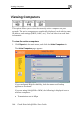
Viewing Computers...........................................................................
Viewing Connections ........................................................................
Viewing Reports
ewing the Event Log
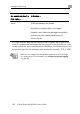
Yo can track network activity using the Event Log. The Event Log displays u
e most recent events and color codes them.
An event marked in
this color…
Indicates…
th
Table 20: Event Log Color Coding
Bl
ity update
implemented by your Service Center
ue Changes in your setup that you have made
yourself or as a result of a secur
Red Connection attempts that were blocked by your
firewall.
Orange Connection attempts that were blocked by your
custom security rules