
User's Manual Part 2




Using Rules
Chapter 7: Setting Your Security Policy 155
Us ide you with
reater flexibility in defining and customizing your security policy.
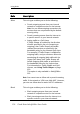
The following rule types exist:
Table 23: Firewall Rule Types
Rule Description
er-defined rules have priority over the default rules and prov
g
Allow and
Forward
This rule type enables you to do the following:
• Permit incoming access from the Internet to
a specific service in your internal network.
• Forward all such connections to a specific
computer in your network.
• Redirect the specified connections to a
specific port. This option is called Port
Address Translation (PAT).
Creating an Allow and Forward rule is equivalent to
defining a server in the Servers page.
Note: You must use this type of rule to allow incoming
connections if your network uses Hide NAT.
Note: You cannot specify two Allow and Forward rules that
forward the same service to two different destinations.