
User's Manual Part 2
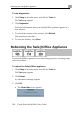







Service Center and Upgrades
288 Check Point Safe@Office User Guide
r and Upg des
ut I only h
functionality. What should I do?
have not installed your product key. formation, see
uct on page 25
eded my node limit. What does th ould I do?
Y aximum num u may
c liance.
The nce tracks the cum mber of nodes on the
i ave communicated e firewall. When the
S unters an IP addr sed
n ers page displa e and
mark s over the node limit in red. These le to access
t lian tected. The
Eve you that you have e limit.
T appliance t a
n r reseller for u e information.
Wh ervice Cent ived the message “The
Se nd”. What shou
• I re using a Service Center other tha
that the Service Cen ed
• e appliance connects to the Service Center using
1/9282. If the Safe@Office appliance is installed
firewall, make sure tha orts are open.
O
I have forgott ord. What shou
R Office appliance to fact g the Reset button
@Office App .
Service Cente ra
I purchased Safe@Office 110, b ave Safe@Office 105
Your For further in
Upgrading Your Software Prod 8.
I have exce is mean? What sh
ber of nodes that yoour Product Key specifies a m
onnect to the Safe@Office app
Safe@Office applia
nternal network that h
ulative nu
through th
afe@Office appliance enco
ode limit, the Active Comput
s node
ess that exceeds the licen
ys a warning messag
nodes will not be ab
he Internet through the Safe@Office app
nt Log page also warns
ce, but will be pro
xceeded the node
o upgrade your Safe@Office
ew Product Key. Contact you
o support more nodes, purchase
pgrad
ile trying to connect to a S
rvice Center did not respo
f you a
er, I rece
ld I do?
n the Check Point
ter IP address is typService Center, check
correctly.
The Safe@Offic
UDP ports 928
behind another
t these p
ther Problems
en my passw
eset your Safe@
ld I do?
ory defaults usin
as detailed in Resetting the Safe liance to Defaults on page 277