
User's Manual Part 2
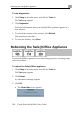







Connectivity
284 Check Point Safe@Office User Guide
• Check if you have defined firewall rules which block your Internet
connectivity.
• Check with your ISP for possible service outage.
• Check whether you are exceeding the maximum number of
computers allowed by your license, by following the procedure
Viewing Computers on page 144.
I cannot access my DSL broadband connection. What should I do?
DSL equipment comes in two flavors: bridges (commonly known as DSL
modems) and routers. Some DSL equipment can be configured to work both
ways.
• If you connect to your ISP using a PPPoE or PPTP dialer defined in
your operating system, your equipment is most likely configured as
a DSL bridge. Configure a PPPoE or PPTP type DSL connection.
• If you were not instructed to configure a dialer in your operating
system, your equipment is most likely configured as a DSL router.
Configure a LAN connection, even if you are using a DSL
connection.
For instructions, see Configuring the Internet Connection on page 57.