
User's Manual Part 2



Setting the Time on the Appliance
268 Check Point Safe@Office User Guide
Note: The Safe@Office 100 series takes the time from your local
computer and you do not have to manually set the time.
To set the time
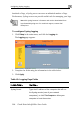
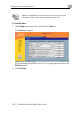
1. Click Setup in the main menu, and click the Tools tab.
The Tools page appears.
If you are using Safe@Office 105 or 110, the page appears without the
Set Time button.
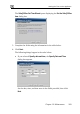
2. Click Set Time.