
User's Manual Part 2



Configuring HTTPS
Chapter 12: Maintenance 265
In this field… Do this…
Clear
Click to clear the Syslog Server field.
S r.
D u
yslog Port Type the port number of the Syslog serve
efa lt
Click to reset the Syslog Port field to the default
(port 514 UDP).
Configuring HTTPS
You ca afe@Office appliance users to access the Safe@Office
Portal do so, you must first configure HTTPS.
n enable S
from the Internet. To
To configure HTTPS
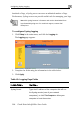
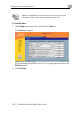
1. Click Setup in the main menu, and click the Management tab.
The Management page appears.