
User's Manual Part 2




Viewing Firmware Status
256 Check Point Safe@Office User Guide
e page appears.
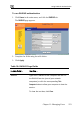
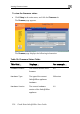
To view the firmware status
• Click Setup in the main menu, and click the Firmware tab.
The Firmwar
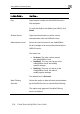
The Firmware page displays the following information:
Table 39: Firmware Status Fields
T Displays… For example… his field…
Firmw rrent version of the
re
4.0 are Version The cu
wafirm
Hardware Type The type of the current
Safe@Office appliance
hardware
200 series
Hardware Version The current hardware
version of the Safe@Office
appliance
1.0