
User's Manual Part 2




Viewing Firmware Status
Chapter 12: Maintenance 255
Chapter 12
This chapter describes the tasks required for maintenance and diagnosis of
you
Th apter includes the following topics:
s...................................................................255
257
258
R ng Your Safe@Office Appliance .........................................262
nfiguring Syslog Logging..............................................................263
.......................265
.......................267
he Appliance via the Command Line.............................271
........................................................272
Up the Safe@Office Appliance Configuration.....................274
the Safe@Office Appliance to Defaults .............................277
..............................279
Viewing Firmware Status
r Safe@Office appliance.
is ch
Viewing Firmware Statu
Updating the Firmware.......................................................................
Upgrading Your Software Product.....................................................
egisteri
Co
Configuring HTTPS ....................................................
etting the Time on the Appliance ..............................S
Controlling t
Using Diagnostic Tools ..............
Backing
Resetting
Running Diagnostics ............................................
Rebooting the Safe@Office Appliance ..............................................280
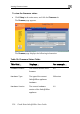
The firmware is the software program embedded in the Safe@Office
appliance.
You can view your current firmware version and additional details.
Maintenance