
User's Manual Part 2






Changing Your Password
Chapter 11: Managing Users 247
sers page appears. The Internal U
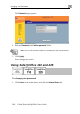
2. In the row of your username, click Edit.
The Edit User page appears.
3. Edit the Password nd Confirm password fields. a
Note: Use 5 to 25 characters (letters or numbers) for the new password.
4. Click Apply.
Your changes are saved.