
User's Manual Part 1




Cloning a MAC Address
Chapter 4: Configuring the Internet Connection 87
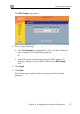
The MAC Cloning page appears.
3. Do one of the following:
• Click This Computer to automatically "clone" the MAC address of
• If th
diff s in the MAC cloning
field.
4. Click A
5. Click B
The Inte your computer’s MAC address
displayed.
your computer to the Safe@Office appliance.
Or
e ISP requires authentication using the MAC address of a
erent computer, enter the MAC addres
pply.
ack.
rnet page reappears with