
User's Manual Part 1




Setting Up a Dialup Modem
84 Check Point Safe@Office User Guide
In this field… Do this…
MTU This field allows you to control the maximum
e default
r
transmission unit size.
As a general recommendation you should leave this
field empty. If however you wish to modify th
MTU, it is recommended that you consult with you
ISP first and use MTU values between 1300 and
1500.
Setting Up a Dialup Modem
You can use a dialup modem as a primary or secondary Internet connection
method. This is useful in locations where broadband Internet access is
ally
dis d when not in use. For information on setting up a dialup backup
connection, see Setting Up a Dialup Backup Connection on page 92.
dem to your Safe@Office
For information on locating the serial port, see Rear Panel on page 17.
2. Click Networ
unavailable.
When used as a backup Internet connection, the modem can be automatic
connecte
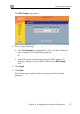
To set up a dialup modem
1. Connect a regular or ISDN dialup mo
appliance's serial port.
k in the main menu, and click the Dialup tab.