
User's Manual Part 1





Using the Internet Wizard
Chapter 4: Configuring the Internet Connection 59
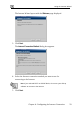
The Internet Wizard opens with the Welcome page displayed.
3. Click Next.
The Internet Connection Method dialog box appears.
4. Select the Internet connection method you want to use for
connecting to the Internet.
Note: If you selected PPTP or PPPoE dialer, do not use your dial-up
software to connect to the Internet.
5. Click Next.