
User's Manual Part 1





Using the Internet Wizard
58 Check Point Safe@Office User Guide
u are using
• Enable Traffic Shaper for traffic flowing through the connection.
For information on Traffic Shaper, see Using Traffic Shaper on page
120.
• Configure a dialup Internet connection.
Before configuring the connection, you must first set up the modem.
For information, see Setting Up a Dialup Modem on page 84.
Using the Internet Wizard
• Internet Setup. Offers advanced setup options. If yo
Safe@Office 110 or 225, you can configure two Internet
connections. In Safe@Office 225, you can also do the following:
The igure your Safe@Office appliance for
Int hrough its user-friendly interface. It
lets tion
Direct LAN Connection
Internet Wizard allows you to conf
ernet connection quickly and easily t
you to choose between the following three types of broadband connec
methods:
•
• Cable Modem
• PPTP or PPPoE dialer
you should skip to step 2 in the procedure below.
set up the Internet c
Note: The first time you log on to the Safe@Office Portal, the Internet
Wizard starts automatically as part of the Setup Wizard. In this case,
To onnection using the Internet Wizard
1. ternet tab.
2.
Click Network in the main menu, and click the In
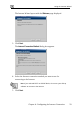
The Internet page appears
Click Internet Wizard.