
User's Manual Part 1





Using the Safe@Office Portal
50 Check Point Safe@Office User Guide
mpt to access the Safe@Office Portal through
Safe@Office appliance is not yet known to
ears.
To avoid seeing this dialog box again, install the certificate of the
If you are using Internet Explorer 5,
View C
ertificate dialog box appears, with the General tab displayed.
lick Install
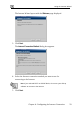
The Certificate Import Wizard
c. Click Next.
d. Click Next.
Finish.
f. Click Yes.
g. Click OK.
The Security
h. Click Yes.
The Safe
g the S
The Safe@Office P ables
you to manage and
options.
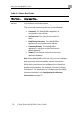
The Safe@Office Portal consists of three major elements.
If this is your first atte
HTTPS, the certificate in the
the browser, so the Security Alert dialog box app
destination Safe@Office appliance.
do the following:
a. Click
The C
ertificate.
b. C Certificate.
opens.
e. Click
Alert dialog box reappears.
@Office Portal appears.
Usin afe@Office Portal
ortal is a web-based management interface, which en
configure the Safe@Office appliance operation and