
User's Manual Part 1





Setting Up the Safe@Office Appliance
42 Check Point Safe@Office User Guide
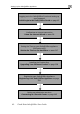
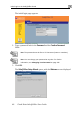
Logging on to the Safe@Office Portal and setting up
your password
Initial Login to the Safe@Office Portal on page 45
Configuring an Internet connection
Using the Internet Wizard on page 58
Setting the Time on your Safe@Office appliance
(200 series only)
Setting the Time on the Appliance on page 267
Installing the Product Key
Upgrading Your Software Product on page 258
Registering your Safe@Office Appliance
Registering Your Safe@Office Appliance on page
262
Setting up subscription services
Connecting to a Service Center on page 165