
User's Manual Part 1





Setting Up the Safe@Office Appliance
Chapter 2: Installing and Setting up the Safe@Office Appliance 41
Figure 6: Typical Connection Diagram
5. In Safe@Office appliance 300W, prepare the Safe@Office appliance for
a wireless connection:
a. Connect the antennas that came with your Safe@Office
appliance to the ANT1 and ANT2 antenna connectors in the
appliance's rear panel.
b. Bend the antennas at the hinges, so that they point upwards.
Setting Up the Safe@Office Appliance
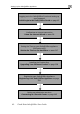
After you have installed the Safe@Office appliance, you must set it up using
the steps shown below.
When setting up your Safe@Office appliance for the first time after
installation, these steps follow each other automatically. After you have
logged on and set up your password, the Safe@Office Setup Wizard
automatically opens and displays the dialog boxes for configuring your
Internet connection. After you have configured your Internet connection, the
Setup Wizard automatically displays the dialog boxes for registering your
Safe@Office appliance. If desired, you can exit the Setup Wizard and
perform each of these steps separately.