
User's Manual Part 1



Before You Install the Safe@Office Appliance
32 Check Point Safe@Office User Guide
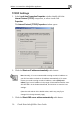
The Network window appears.
3. In the Network window, check if TCP/IP appears in the network
components list and if it is already configured with the Ethernet
ur computer.
Installing
card, installed on yo
TCP/IP Protocol
Note: If TCP/IP is already installed and configured on your computer skip
this section and move directly to TCP/IP Settings.
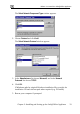
1. In the Network window, click Add.