
User's Manual Part 1



Before You Install the Safe@Office Appliance
Chapter 2: Installing and Setting up the Safe@Office Appliance 31
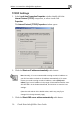
4. gs.
Your computer is now ready to access your Safe@Office appliance.
Windows 98/Millennium
Checking the TCP/IP Installation
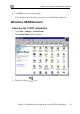
1. Click Start > Settings > Control Panel.
The Control Panel window appears.
Click OK to save the new settin
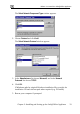
2. Double-click the
icon.