
User's Manual Part 1



Before You Install the Safe@Office Appliance
30 Check Point Safe@Office User Guide
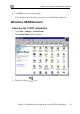
s window double-click the
ect it and click
window opens.
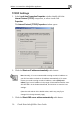
TCP/IP Settings
1. In the Local Area Connection Propertie
Internet Protocol (TCP/IP) component, or sel
Properties.
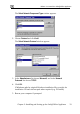
The Internet Protocol (TCP/IP) Properties
2. Click the Obtain an IP address automatically radio button.
Note: Normally, it is not recommended to assign a static IP address to
your PC but rather to obtain an IP address automatically. If for some
reason you need to assign a static IP address, select Specify an IP
address, type in an IP address in the range of 192.168.10.129-254, enter
255.255.255.0 in the Subnet Mask field, and click OK to save the new
settings.
(Note that 192.168.10 is the default value, and it may vary if you
changed it in the My Network page.)
3. Click the Obtain DNS server address automatically radio button.