
User's Manual Part 1





Before You Install the Safe@Office Appliance
28 Check Point Safe@Office User Guide
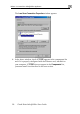
The Local Area Connection Properties window appears.
4. n the components list
an properly configured with the Ethernet card, installed on
mponents list,
.
In the above window, check if TCP/IP appears i
d if it is
your computer. If TCP/IP does not appear in the Co
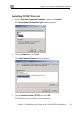
you must install it as described in the next section