
User's Manual Part 1





Before You Install the Safe@Office Appliance
26 Check Point Safe@Office User Guide
Windows 2000/XP
Note: While Windows XP has an "Internet Connection Firewall" option, it
is recommended to disable it if you are using a Safe@Office
appliance, since the Safe@Office appliance offers better protection.
If you want to subscribe to SecureDesk, you must disable the Windows
XP firewall before you install the antivirus software. For information on
SecureDesk, see Using SecureDesk on page 183.
Checking the TCP/IP Installation
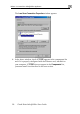
1. Click Start > Settings > Control Panel.
The Control Panel window appears.
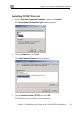
2. Double-click the Network and Dial-up Connections icon.