
User's Manual Part 1





Getting to Know Your Safe@Office 300 Series Appliance
22 Check Point Safe@Office User Guide
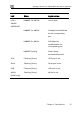
Label Description
A
ANT
fice 300W only) NT 1/ Antenna connectors (Safe@Of
2
F
r the appliance’s operation.
ront Panel
The Safe@Office 300 appliances includes several status LEDs that enable
you to monito
Figure 5: Sa ffice 300 Appliance Fr
For an explanation of the Safe@Office 300 appliance’s status LEDs, see the
table below.
Table 6: Safe@O
ED
fe@O ont Panel
ffice 300 Appliance Status LEDs
L State Explanation
PWR/SEC Off Power off
Flashing quickly (Green) boot-up
n) nternet
connection
On (Green) Normal operation
On (Red)
System
Flashing slowly (Gree Establishing I
Flashing (Red) Hacker attack blocked
Error