
User's Manual Part 1





Getting to Know Your Safe@Office 300 Series Appliance
20 Check Point Safe@Office User Guide
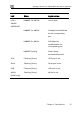
LED State Explanation
LINK/ACT On, 100 Off
10 Mbps link es
for the correspondin
port
tablished
g
LINK/ACT On, 100 On
corresponding port
LNK/ACT Flashing
Data is being
d
Serial port in use
100 Mbps link
established for the
transmitted/receive
VPN Flashing (Green) VPN port in use
Serial Flashing (Green)
Getting to Know Your Safe@Office 300
S
R
All physical connections (network and power) to the Safe@Office appliance
The following table lists the Safe@Office 300 appliance's rear panel
nts.
eries Appliance
ear Panel
are made via the rear panel of your Safe@Office appliance.
eleme