
User's Manual Part 1




Getting to Know Your Safe@Office 200 Series
Chapter 1: Introduction 19
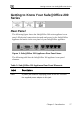
Front Panel
The Safe@Office 200 appliances includes several status LEDs that enable
you to monitor the appliance’s operation.
Figure 4: Safe@Office 200 Appliance Front Panel
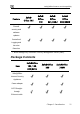
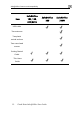
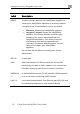
For an explanation of the Safe@Office 200 appliance’s status LEDs, see the
4: Safe@ 200 Appliance Statu
e on
table below.
Table Office s LEDs
LED Stat Explanati
PWR/SEC Off Power off
Flashing quickly (Green) System boot-up
Establishing
Flashing slowly (Green) Internet
ed) r attack blocked
MZ/WAN2
LINK/ACT Off, 100 Off
Link is down
connection
On (Green) Normal operation
Flashing (R Hacke
LAN 1-
4/WAN/
On (Red) Error
D