
User's Manual Part 1



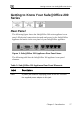

Getting to Know Your Safe@Office 200 Series
18 Check Point Safe@Office User Guide
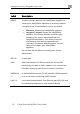
Label Description
RESET A button used for rebooting the Safe@Office appliance or
resetting the Safe@Office appliance to its factory defaults.
You need to use a pointed object to press this button.
• Short press. Reboots the Safe@Office appliance
• Long press (7 seconds). Resets the Safe@Office
appliance to its factory defaults, and resets your
firmware to the version that shipped with the
Safe@Office appliance. This results in the loss
of all security services and passwords and
reverting to the factory default firmware. You will
have to re-configure your Safe@Office
appliance.
Do not reset the unit without consulting your system
administrator.
RS-232 A serial port
WAN Wide Area Network: An Ethernet port (RJ-45) used for
connecting your cable or xDSL modem, or for connecting a
hub when setting up more than one Internet connection
DMZ/WAN
2
A dedicated Ethernet port (RJ-45) used for a DMZ computer,
or for a hub when connecting a DMZ network
LAN 1-4 Local Area Network switch: Four Ethernet ports (RJ-45) used
for connecting computers or other network devices