
User's Manual Part 1



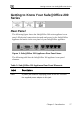

Getting to Know Your Safe@Office 100 Series
16 Check Point Safe@Office User Guide
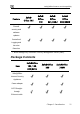
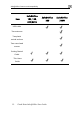
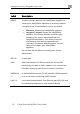
Table 2: Safe@Office 100 Appliance Status LEDs
LED State Explanation
PWR/SEC Off Power off
Flashing quickly (Green) System boot-up
Flashing slowly (Green) Establishing Internet
connection
On (Green) Normal operation
Flashing (Red) Hacker attack blocked
On (Red) Error
LAN 1-
4/WAN
LINK/ACT Off, 100 Off
Link is down
LINK/ACT On, 100 Off
10 Mbps link established
for the corresponding
port
LINK/ACT On, 100 On
100 Mbps link
established for the
corresponding port
LNK/ACT Flashing
Data is being
transmitted/received