
User's Manual Part 1




Getting to Know Your Safe@Office 100 Series
14 Check Point Safe@Office User Guide
Getting to Know Your Safe@Office 100
Series
Rear Panel
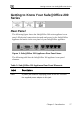
The following figure shows the Safe@Office 100 series appliance's rear
panel. All physical connections (network and power) to the Safe@Office
appliance are made via the rear panel of your Safe@Office appliance.
Figure 1: Safe@Office Appliance 100 Rear Panel Items
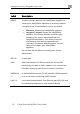
The following table lists the Safe@Office appliance's rear panel elements.
Table 1: Safe@Office Appliance 100 Rear Panel Elements
Label Description
PWR A power jack used for supplying power to the unit. Connect
the supplied power adapter to this jack.