
User's Manual Part 1





Using Static Routes
Chapter 5: Managing Your Network 139
Table 1
In this
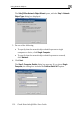
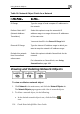
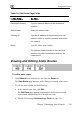
9: Edit Route Page Fields
field… Do this…
Destination Network Type the network address of the destination
network.
Subnet Mask Select the subnet mask.
Gateway IP Type the IP address of the gateway (next hop
router) to which to route the packets destined for
this network.
Metric Type the static route's metric.
The gateway sends a packet to the route that
matches the packet's destination and has the
lowest metric.
Viewing and Editing Static Routes
To edit a static route
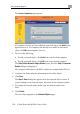
1. Click Network in the main menu, and click the Routes tab.
The Static Routes page appears, with a listing of existing static routes.
2. To edit the route details, do the following:
a. In the desired route row, click Edit.
The Edit Route page appears displaying the destination network,
subnet mask, and gateway IP of the selected route.
b. Edit the fields using Edit Route Page Fields on page 139.