
User's Manual Part 1





Using Static Routes
Chapter 5: Managing Your Network 137
b.
Using Static Routes
A confirmation message appears.
Click OK.
The network object is deleted.
A s
des
any
To Connection on page 68.
Th
ind
d
tatic route is a setting that explicitly specifies the route for packets
tined for a certain subnet. Packets with a destination that does not match
defined static route will be routed to the default gateway.
modify the default gateway, see Using a LAN
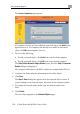
e Static Routes page lists all existing routes, including the default, and
icates whether each route is currently "Up", or reachable, or not.
ding a Static Route A
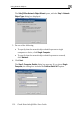
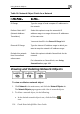
To add a
1. C k N the Routes tab.
static route
etwork in the main menu, and clicklic