
User's Manual Part 1
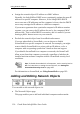





Using Network Objects
136 Check Point Safe@Office User Guide
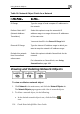
Table 18: Network Object Fields for a Network
In this field… Do this…
IP Range Type the range of local computer IP addresses in
the network.
P
(N
Tr
of the same size.
en fill in the External IP Range field.
External IP Ra e to which you
etwork's IP address range.
Exclu
from
enfor
he
twork.
SecureDesk on page 183.
erform Static NAT
etwork Address
anslation)
Select this option to map the network's IP
address range to a range of Internet IP addresses
You must th
nge Type the Internet IP address rang
want to map the n
de this network
SecureDesk
Select this option to disable SecureDesk for t
ne
cement
For information on SecureDesk, see Using
Viewing and Deleting Network Objects
To vie t
1. Cli
Th
2. To llowing:
a.
w or delete a network objec
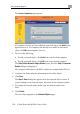
ck Network in the main menu, and click the Network Objects tab.
e Network Objects page appears with a list of network objects.
delete a network object, do the fo
In the desired network object's row, click the Delete
icon.