
User's Manual Part 1





Using Network Objects
Chapter 5: Managing Your Network 135
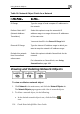
T t Fields for a Single Computer
In this field…
able 17: Network Objec
Do this…
IP Address Type the IP address of the local computer, or
click This Computer to specify your computer.
Reserve this IP for use
by the following MAC
address
Select this option to assign the network object's
IP address to a MAC address.
MAC Address Type the MAC address you want to assign to the
network object's IP address, or click This Computer
to specify your computer's MAC address.
Perform Static NAT
(Netw
Translation)
Select this option to map the local computer's IP
Internet IP address.
field.
Exter ss to which you want to
Exclude
from Sec
enforcem
ecureDesk for the
k on page 183.
ork Address
address to an
You must then fill in the External IP
nal IP Type the Internet IP addre
map the local computer's IP address.
this computer
Select this option to disable S
ureDesk
ent
computer.
For information on SecureDesk, see Using
SecureDes