
User's Manual Part 1





Using Network Objects
Chapter 5: Managing Your Network 133
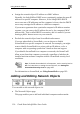
If you chose Network, the dialog box does not include this option.
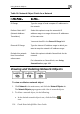
5. Complete the fields using the information in the tables below.
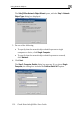
The Step 3: Save dialog box appears.
6. Click Next.
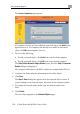
network object in the field. 7. Type a name for the
8. Click Finish.
it a netw e
1. Click Reports in the main menu, and click the Active Computers tab.
To add or ed ork object via the Active Computers pag