
User's Manual Part 1
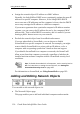





Using Network Objects
132 Check Point Safe@Office User Guide
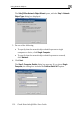
The Safe@Office Network Object Wizard opens, with the Step 1: Network
Object Type dialog box displayed.
3. Do one of the following:
• To specify that the network object should represent a single
computer or device, click Single Computer.
• To specify that the network object should represent a network,
click Network.
4. Click Next.
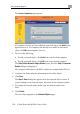
The Step 2: Computer Details dialog box appears. If you chose Single
Computer, the dialog box includes the Perform Static NAT option.