
User's Manual Part 1





Using Network Objects
Chapter 5: Managing Your Network 131
age
network
Objects page
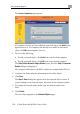
1. nd click the Network Objects tab.
rk Objects page appears with a list of network objects.
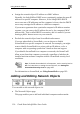
• The Active Computers p
This page enables you to add only individual computers as
objects. The computer's details are filled in automatically in the wizard.
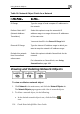
To add or edit a network object via the Network
Click Network in the main menu, a
The Netwo
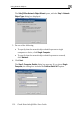
2. Do one of the following:
• To add a network object, click New.
• To edit an existing network object, click Edit next to the desired
computer in the list.