
User's Manual Part 1







Using Traffic Shaper
128 Check Point Safe@Office User Guide
Restoring Traffic Shaper Defaults
The Safe@Office appliance provides four built-in QoS classes:
If desired, you can reset the Traffic Shaper bandwidth policy to use these
classes, and restore the classes to their default settings (shown above).
Note: This will d
If one of the additional classes is currently used by a rule,
elete any additional classes u defined in
lt class.
you cannot reset Traffic Shaper to defaults. You can
ine whether a class is in use or not, by viewing the
ge.
To restore Traffic Shaper defaults
1. Click Network in the main menu, and click the Traffic Shaper tab.
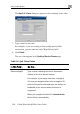
The Quality of Service Classes page appears.
2. Click Restore Defaults.
A confirmation message appears.
3. Click OK.
yo
Traffic Shaper and reset all rules to use the Defau
determ
Rules pa