
User's Manual Part 1




Safe@Office Products
2 Check Point Safe@Office User Guide
updates, Web filtering, and dynamic DNS. Business users can use the
Safe@Office appliance to securely connect to the office network.
Safe@Office Products
The Safe@Office appliance is available with the following hardware:
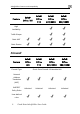
• Safe@Office 100 series
• Safe@Office 200 series
• Safe@Office 300 series
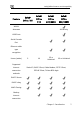
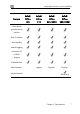
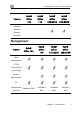
All three series provide a Web-based management interface, which enables
you to manage and configure the Safe@Office appliance operation and
options. However, the 200 series and 300 series provide higher firewall and
VPN throughput and have a dedicated DMZ port and a serial port. The 300
series also provides two USB ports enabling printer server functionality, and
the 300W functions as an access point for a wireless network.
The 100 series includes models Safe@Office 105 and Safe@Office 110. The
200 series includes models Safe@Office 225 and Safe@Office 225U. The
300 series includes models Safe@Office 300 and Safe@Office 300W.
Your 100 and 200 series Safe@Office appliance can be upgraded to a more
advanced model within its hardware series, without replacing the hardware.
Contact your reseller for more details.
Safe@Office 105
Safe@Office 105 protects your home or small business network from hostile
Internet activity. It can also act as a Remote Access VPN Server which
allows a single user to securely access resources protected by the
Safe@Office appliance from home or while traveling. It is intended for home
or small business users and can be used by up to five computers.
Safe@Office 110
In addition to all the benefits of Safe@Office 105, Safe@Office 110 provides
expanded VPN functionality: it acts not only as a Remote Access VPN
Server but as a Remote Access VPN Client, enabling employees working