
User's Manual Part 1





Configuring Network Settings
108 Check Point Safe@Office User Guide
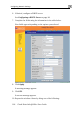
Table 15: WLAN Settings Fields
In this field… Do this…
IP Address s default
ga w
Note:
netwo
Type the IP address of the WLAN network'
te ay.
The WLAN network must not overlap the LAN
rk.
Subnet Mask Type
Wireless Settings
Network Name
(SSID)
phanumeric characters long and is
are located.
Warni sult in
the vi government regulations.
the WLAN’s internal network range.
Type the network name (SSID) that identifies your
wireless network.
It can be up to 32 al
case-sensitive.
Country Select the country where you
ng: Choosing an incorrect country may re
olation of