
User's Manual Part 1





Configuring Network Settings
106 Check Point Safe@Office User Guide
6. If desired, configure a DHCP server.
See Configuring a DHCP Server on page 94.
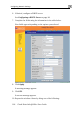
plete the fields using the information in the table below. 7. Com
New fields appear depending on the options you selected.
8. Click Apply.
A warning message appears.
9. Click OK.
A success message appears.
10. Prepare the wireless clients by doing one of the following: