
User's Manual Part 1





Configuring Network Settings
Chapter 5: Managing Your Network 105
• In the Management page, select ANY in either the SSH or HTTPS
drop-down list.
• Create a custom f w rom
the WLAN, or from a
To configure a WLAN
1. Prepare the appliance d in
Network Installation
2. Click Network in the .
The My Network page
3. In the WLAN networ
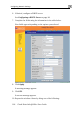
The Edit Network Set
ire all rule to allow the desired protocols f
n IP address in the WLAN.
network
for a wireless connection as describe
on page 40.
main menu, and click the My Network tab
appears.
k's row, click Edit.
tings page appears.
4. In the Mode drop-down list, select Enabled.
The fields are e
5. If desired, enab e Hide NAT.
See Enabling/Disabling Hide NAT on page 101.
nabled.
le or disabl