
User's Manual Part 1




Configuring Network Settings
Chapter 5: Managing Your Network 99
Configuring DHCP Relay
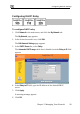
To configure DHCP relay
1. Click Network in the main menu, and click the My Network tab.
The My Network page appears.
2. In the desired network's row, click Edit.
The Edit Network Settings page appears.
3. In the DHCP Server list, select Relay.
The Automatic DHCP range check box is disabled, and the Relay to IP field
appears.
4. e IP address of the desired DHCP
5. i
A w .
6. Cli
In the Relay to IP field, type th
server.
Cl ck Apply.
arning message appears
ck OK.