
User's Manual Part 1




Configuring Network Settings
Chapter 5: Managing Your Network 97
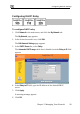
To configure the DHCP address range
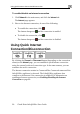
1. Cl ck Network in the main menu, and click the My Network tab.
network's row, click Edit.
e appears.
HCP range manually:
range check box.
If desired, you can set the Safe@Office DHCP range manually.
i
The My Network page appears.
2. In the desired
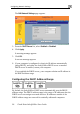
The Edit Network Settings pag
3. To set the D
a. Clear the Automatic DHCP
The DHCP IP range fields appear.
b. In the DHCP IP range fields, type the desired DHCP range.
To allow the DH4. CP server to set the IP address range, select the
5. C
Automatic DHCP range check box.
lick Apply.
A warning message appears.
6. Click OK.
A success message appears